Posts Tagged: ‘houdini’


Siggraph 2010

Saturday, July 31st, 2010 No Comments »

Siggraph 2010 was held in Los Angeles, CA this year at the LA Convention Center. This was my first Siggraph conference, so I went with high expectations.  However, I was left a little disappointed. The first day as I drove in, I was a little worried since the parking garages were fairly empty. Apparently, the turnout was very low this year in comparison to a few years ago and this is of course understandable, given the present state of the economy. The job fair was pretty bad (not many companies showed up), but the exhibition was alright. Chaos Group had a big booth showing off their V-Ray renderer, which is supposedly the best one-click renderer now. I haven’t actually used it yet, so I don’t know, but the demos looked great and fast. I’ll likely migrate from Mental Ray eventually if it makes sense. Pixologic was demoing some new features in Zbrush which looked pretty wicked. I checked out Pixar’s booth where they showed the Renderman shaders for creating the heaps of garbage in Toy Story 3. Next Limit had some pretty nice simulations using Realflow.

I also attended a special Side Effects Houdini event on Tuesday night at the Cooper building. The venue was great. SideFX showed off some new features in Houdini 2011, specifically the new voronoi-based fracturing system, particle fluids solver, and hardware rendering improvements. Digital Domain talked about how they used Houdini to create some very nice fire and fluid effects in Percy Jackson & the Olympians: The Lightning Thief. Framestore NY stepped through their process in creating ground fractures in the current movie Salt. Lastly, Motion Theory illustrated how they accomplished some neat fluid effects for a Disney commercial, “World of Color”.

Overall, I felt a little disappointed in the conference this year. But I also didn’t have access to many of the talks and presentations. I heard the Behind the scenes of Avatar and Making of Tron were pretty awesome. I also only attended for 2 days, so it might have gotten better afterwards. Hopefully the economy picks up next year and we’ll get more people. The conference will be in Vancouver, Canada next year (the first time it is outside of the USA).


Houdini to Maya (BGEO import/export)

Saturday, January 24th, 2009 3 Comments »

I found this maya plugin that seems to work reasonably well for importing a BGEO sequence from Sidefx Houdini into Autodesk Maya.

You can download the plugin from here: http://www.houdinistuff.com/

The instructions provided in the readme file can be a bit confusing.  Here are the steps I used to successfully load a Bgeo sequence from houdini:

  1. Save the bgeo.mll file into your plugins folder and load it in maya.
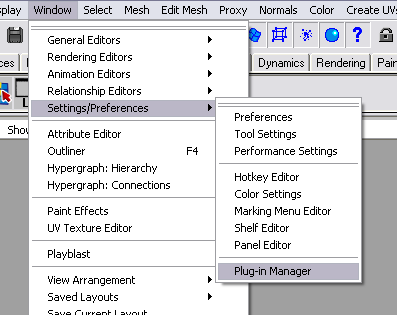
    mbeo_maya_plugin
  2. Open the command line editor and run: mBgeoReader
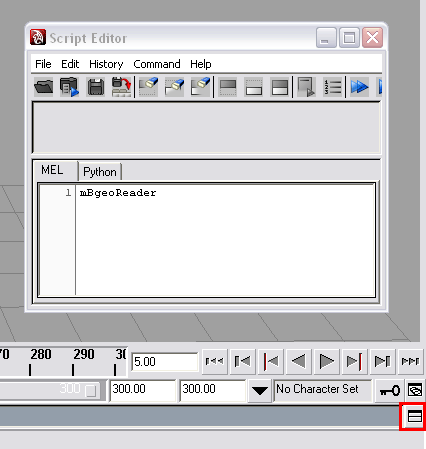
    mbgeo_maya_script_editor
  3. This will create a new poly object called mBgeoReader. Check in the outliner window.
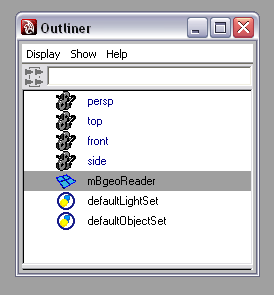
    mbgeo_maya_outliner
  4. Select the object and go to the attribute editor.
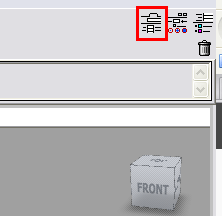
    mbeo_maya_attribute_editor
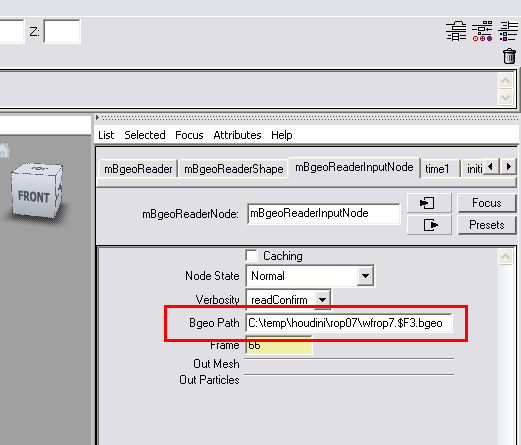
  5. Enter the Path to the bgeo files.
    mbeo_maya_bgeo_path
  6. Done. You can pan through the timeline to see the animation sequence.

I haven’t yet tried exporting a Bgeo sequence from Maya, but the import worked successfully. Some problems that you may run into are attributes like velocity that aren’t  transferred into the Maya scene. At least I haven’t been able to during my test run. If there is a way, let me know. Without the velocity attribute, I wasn’t able to produce an accurate motion blur in Maya.

It may be a good idea to turn off any attributes in Houdini before using the ROP output note to create the bgeo sequence. This should increase performance in Maya. Lastly, use the geometry cacheing in Maya to speed things up if needed.


Bee Swarm

Monday, April 21st, 2008 No Comments »

Screenshots: